Email Signature Size, Measured Against Official Boxes and CSS Layout Models
Local fixtures and documented constraints, not live Gmail or Outlook rendering.
An 800×200 pixel banner is already twice as tall as the official Gmail maximum for a signature image. Google's help page, fetched on 22 November 2026, recommends a signature image 70–100 pixels high by 300–400 pixels wide, and it states a maximum of 100 pixels high by 1000 pixels wide. I did not open Gmail or Outlook, and I did not send a test message. This post measures local calibration files, applies those official boxes, and computes CSS and HTML layout models. Every display size below is a model prediction, not a client screenshot.
A signature that includes a photo still has to start from a real file at a known size. ProfessionalHeadshot, an AI professional headshot generator, publishes a free in-browser tool that can attach an optional headshot URL to HTML or plain-text output, and I am using that page as the email signature size landing here. I did not take measurements from the tool preview. The numbers below come from official documentation and from the fixtures in the companion folder.
Official boxes, and what Microsoft does not publish
The pixel numbers I treated as constraints come from Use a signature image in the recommended size. The page, read on 22 November 2026, says: "We recommend a signature image that's 70–100 pixels high by 300–400 pixels wide. The maximum size for email signature images is 100 pixels high by 1000 pixels wide." It also tells you to resize the image before you upload it. After upload, the editor offers size options labeled Small, Medium, Large, or Original. I did not measure what those four labels map to in pixels, so they do not appear as numbers in the tables.
The same range and the same 100×1000 maximum are repeated on Google's Workspace admin page for user signatures, which displayed "Last updated 2026-11-10 UTC" when I fetched it. A second Gmail help page, Create an email signature, states a 10,000-character limit and says the image counts toward that limit. I did not measure how Gmail accounts for image data inside that budget.
How to add and change an email signature in Outlook, fetched the same day, explains how to insert a picture and how to resize it. In classic Outlook for Windows, the documented path is to right-click the image, open Picture, use the Size tab, and keep Lock aspect ratio checked if you want to preserve proportions. The page warns that Vector Markup Language (VML) tags can cause some elements to appear as attachments instead of inline images. It does not publish a recommended pixel size, and I will not invent one.
The layout math uses CSS Images Module Level 3, a W3C Candidate Recommendation Draft dated 18 December 2023. object-fit: contain sizes the content "to maintain its natural aspect ratio while fitting within the element's content box." object-fit: cover sizes the content "to maintain its natural aspect ratio while filling the element's entire content box." The initial value, fill, makes the concrete object size equal to the used width and height, which can distort the source when the aspects differ. Cover uses the default object-position: 50% 50%, a center crop. I did not test whether any particular email client applies these properties.
What I actually measured
The companion script measure_signature_size.py builds ten PNG calibration charts and a quality-85 JPEG of each one, then verifies the decoded pixel size of every file. Each chart has a 10-pixel edge ruler, a 50-pixel grid, and uniquely colored corner marks so a crop is visible. Headshot-style charts also have a center oval as a crop target, not a photograph of a person. The set is:
- Official Gmail recommended corners and midpoint: 300×70, 400×100, and 350×85.
- Official Gmail maximum: 1000×100.
- Two unofficial 4:1 fixtures that exceed the official height cap: 600×150 and 800×200. They keep the same aspect as the official recommended upper box, so a uniform scale lands exactly on 400×100. They are comparison fixtures, not official sizes.
- Headshot-style charts: 400×400, 200×200, 100×100, and a 3:2 chart at 600×400.
I then computed four layout models against the official boxes, plus a square 100×100 avatar box: contain; cover (center); fill, which is also the naive model of HTML width and height attributes both set to the box; and max-width: 100%; height: auto in hypothetical 320-pixel and 600-pixel panes. Those pane widths are inputs to the model, not measured Gmail or Outlook window sizes.
Integer display pixels are rounded with ROUND_HALF_UP. Exact floating values are in out/metrics.json. Seventeen unit tests pin the closed-form cases below. The run is python3 measure_signature_size.py.
Height versus the official 100-pixel cap
| Fixture | Pixels | Aspect | Exceeds official 100 px height | PNG bytes | JPEG q85 bytes |
|---|---|---|---|---|---|
| gmail-rec-lower-300x70 | 300×70 | 4.2857 | no | 1,265 | 4,513 |
| gmail-rec-mid-350x85 | 350×85 | 4.1176 | no | 1,781 | 5,672 |
| gmail-rec-upper-400x100 | 400×100 | 4.0000 | no | 1,461 | 5,588 |
| gmail-official-max-1000x100 | 1000×100 | 10.0000 | no | 1,617 | 11,565 |
| unofficial-600x150 | 600×150 | 4.0000 | yes | 2,087 | 9,540 |
| unofficial-800x200 | 800×200 | 4.0000 | yes | 2,443 | 14,090 |
| headshot-square-400x400 | 400×400 | 1.0000 | yes | 3,480 | 16,439 |
| headshot-square-200x200 | 200×200 | 1.0000 | yes | 2,061 | 6,660 |
| headshot-square-100x100 | 100×100 | 1.0000 | no | 1,093 | 3,080 |
| headshot-3x2-600x400 | 600×400 | 1.5000 | yes | 4,495 | 21,805 |
The official recommended range and the official maximum all sit at or under 100 pixels of height. The two unofficial 4:1 banners do not. A square 400×400 or 200×200 file, used at native size as a single signature image, also exceeds the cap. A 100×100 square is already at it.
On these flat-color charts, the quality-85 JPEG was larger than the optimized PNG in every fixture. That is a property of this synthetic artwork, not a claim about photographic headshots, and not a measurement of Gmail's or Outlook's encoding.
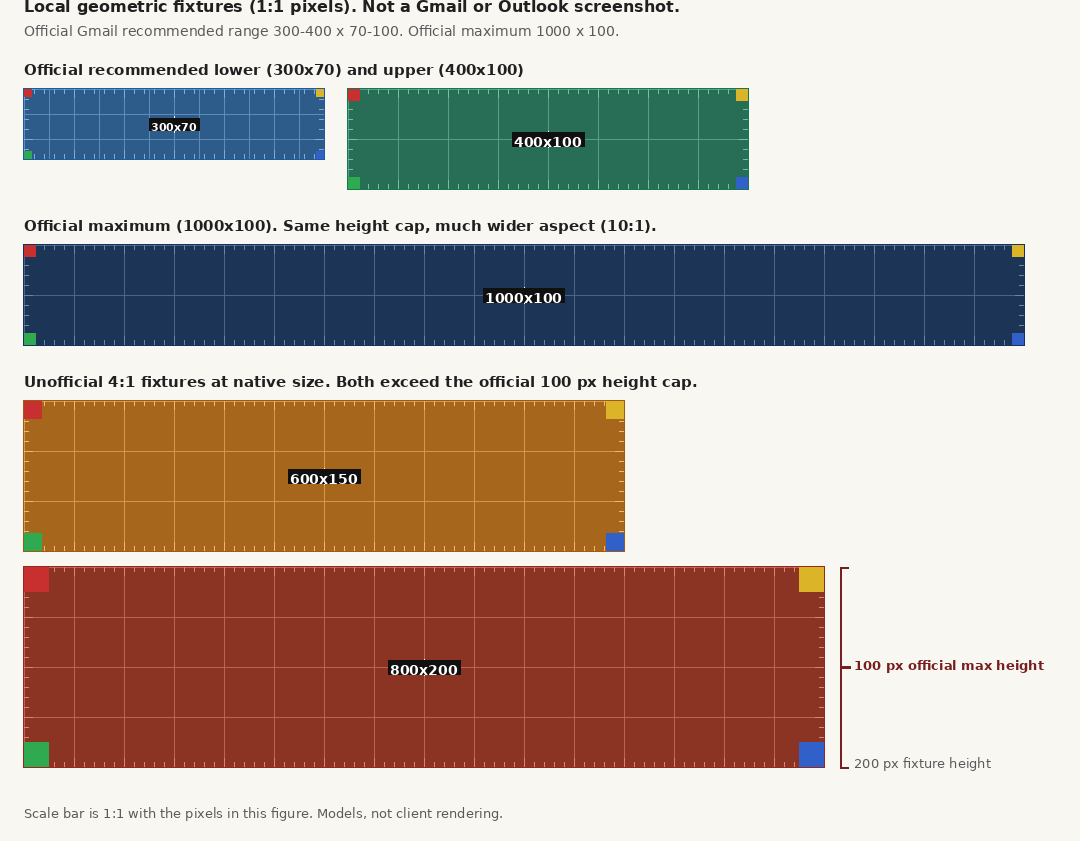
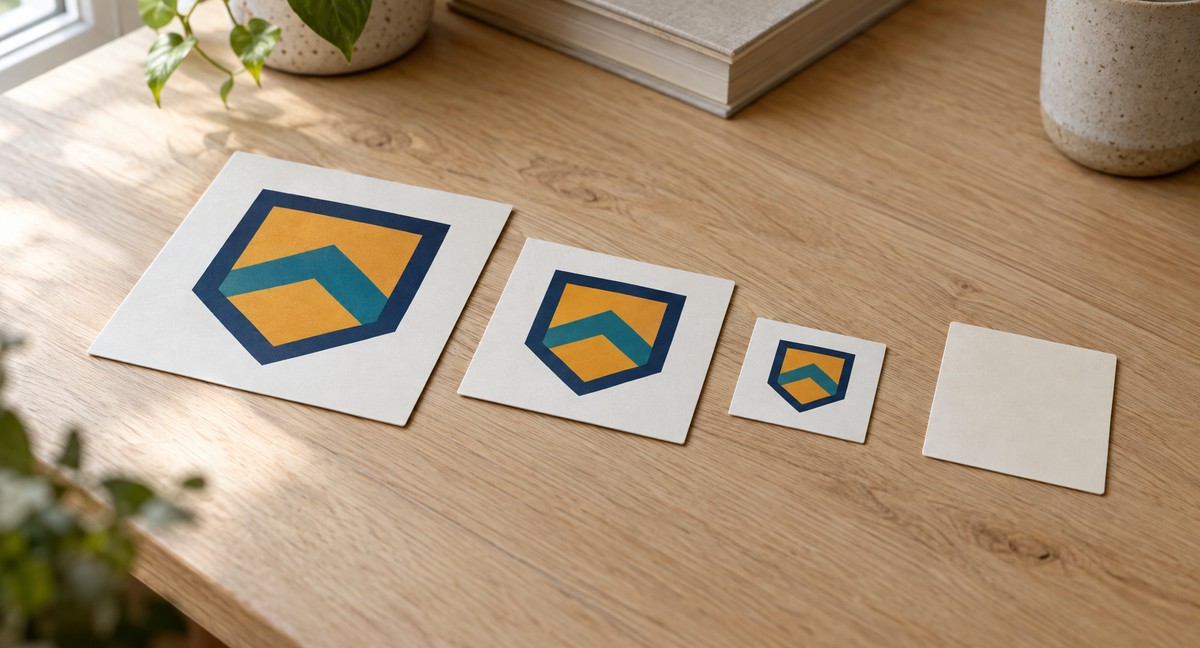
Figure 1. Official and unofficial fixtures at 1:1 pixels, with the official 100-pixel height cap marked against the 800×200 chart. This is a local geometric layout, not a Gmail or Outlook screenshot.
Uniform scale into the recommended 400×100 box
Because 800×200 and 600×150 share the 4:1 aspect of the official recommended upper box, contain and cover are identical for those two fixtures. There is no letterbox and no crop, only a uniform scale:
| Source | Model | Scale | Display | Letterbox | Crop |
|---|---|---|---|---|---|
| 800×200 into 400×100 | contain or cover | 0.5 | 400×100 | none | none |
| 600×150 into 400×100 | contain or cover | 2/3 | 400×100 | none | none |
If you resize those unofficial banners before upload, as the Gmail page asks, and you preserve aspect, they land exactly on the official recommended upper box. I did not test whether Gmail rejects, downscales, or accepts a 200-pixel-tall file if you skip that step. The 100-pixel maximum is a documented cap, not an enforcement result from this environment.
The official maximum itself is a different aspect, 10:1. Fitting 1000×100 into the recommended 400×100 box is no longer a uniform shrink:
| Source | Model | Scale | Display | Unused or clipped |
|---|---|---|---|---|
| 1000×100 into 400×100 | contain | 0.4 | 400×40 | 60 px of letterbox height |
| 1000×100 into 400×100 | cover | 1.0 | 400×100 | 300 source px cropped from each side (window x=300–700) |
| 1000×100 into 400×100 | fill | scale_x=0.4, scale_y=1.0 | 400×100 | aspect not preserved |
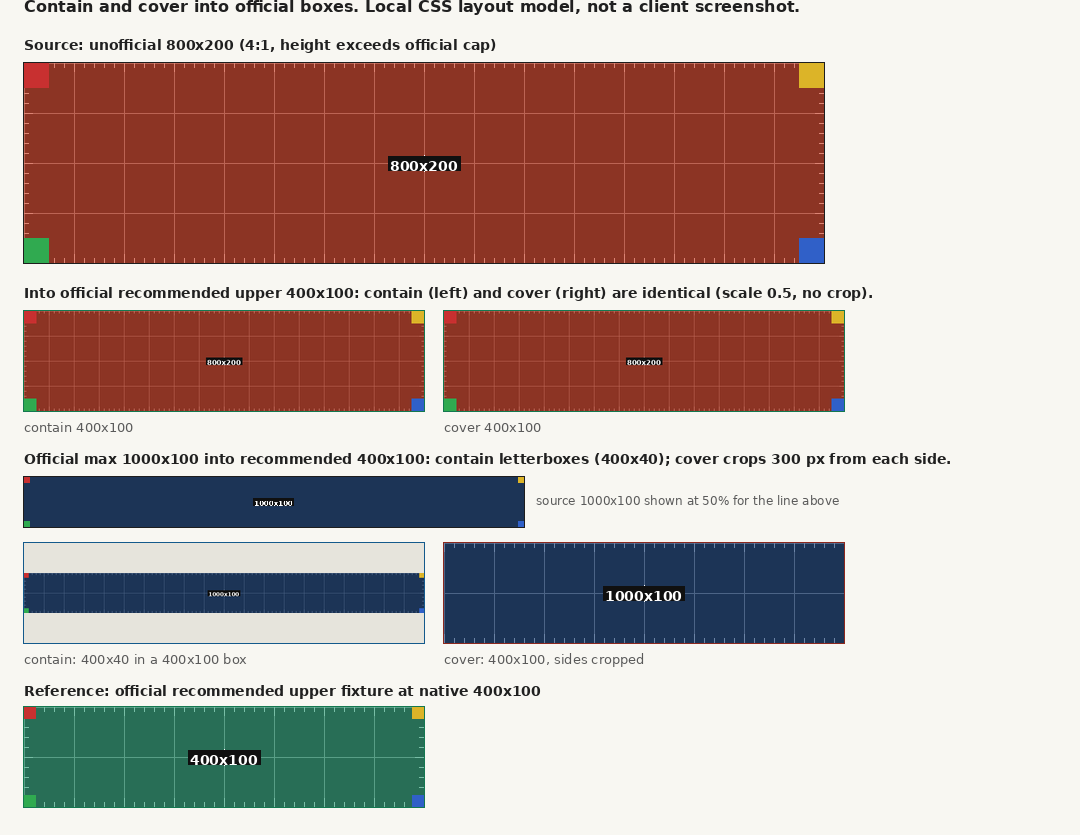
Figure 2. Contain and cover into official boxes. The 800×200 pair is identical at scale 0.5. The 1000×100 pair is not: contain letterboxes to 400×40, and cover keeps 400×100 by clipping the sides. Local CSS layout model, not a client screenshot.
A 1000-pixel-wide official-max file also changes under a narrow pane. In the max-width: 100%; height: auto model, a 320-pixel pane displays that file at 320×32 (scale 0.32). A 600-pixel pane displays it at 600×60. A 400×100 recommended file already fits a 600-pixel pane and stays 400×100; in a 320-pixel pane it becomes 320×80. Those pane widths are model inputs, not measured Gmail or Outlook reading panes.
What a headshot file loses in a signature box
A square 400×400 chart shows the difference between letterboxing and cropping more clearly than the 4:1 banners do.
| Box | contain | cover |
|---|---|---|
| 100×100 (official max height, square) | scale 0.25, display 100×100, no crop | same: scale 0.25, no crop |
| 100×70 (recommended height lower bound) | scale 0.175, display 70×70, 30 px of letterbox width | scale 0.25, display 100×70, 60 source px cropped from the top and 60 from the bottom (window y=60–340) |
| 300×70 (recommended lower banner) | scale 0.175, display 70×70, 230 px of letterbox width | scale 0.75, display 300×70, 115 source px cropped from the top and 115 from the bottom (window y=115–285) |
| 400×100 (recommended upper banner) | scale 0.25, display 100×100, 300 px of letterbox width | scale 1.0, display 400×100, 150 source px cropped from the top and 150 from the bottom (window y=150–250) |
The last row is the harsh case. Cover at scale 1.0 keeps the full 400-pixel width and discards three quarters of the vertical frame, equally from the top and the bottom in a center crop. Contain keeps the whole square and leaves 300 pixels of unused width in the banner. Fill, if you set HTML width="400" and height="100" on a 400×400 source, stretches independently on each axis (scale_x=1.0, scale_y=0.25) and distorts the square into a 4:1 smear. That is the CSS initial object-fit: fill behavior and a naive attribute model. I did not test which path a given client takes.
A 3:2 chart at 600×400 loses a different slice. Cover into 100×100 uses scale 0.25. The scaled rectangle is 150×100, so 50 display pixels of width are clipped, which is 100 source pixels from the left and 100 from the right (window x=100–500, y=0–400). Cover into the 400×100 banner uses scale 2/3, fills the banner, and crops 100 source pixels from the top and 100 from the bottom (window y=100–300). Square boxes take the sides. Wide, short boxes take the top and bottom.
I used a similar compositing approach, building source charts and placing them into target cells, in Image Combiner in Python With Pillow: Side-by-Side, Grid, Overlay, and Blend. The crop windows here follow official Gmail boxes, not a general grid.
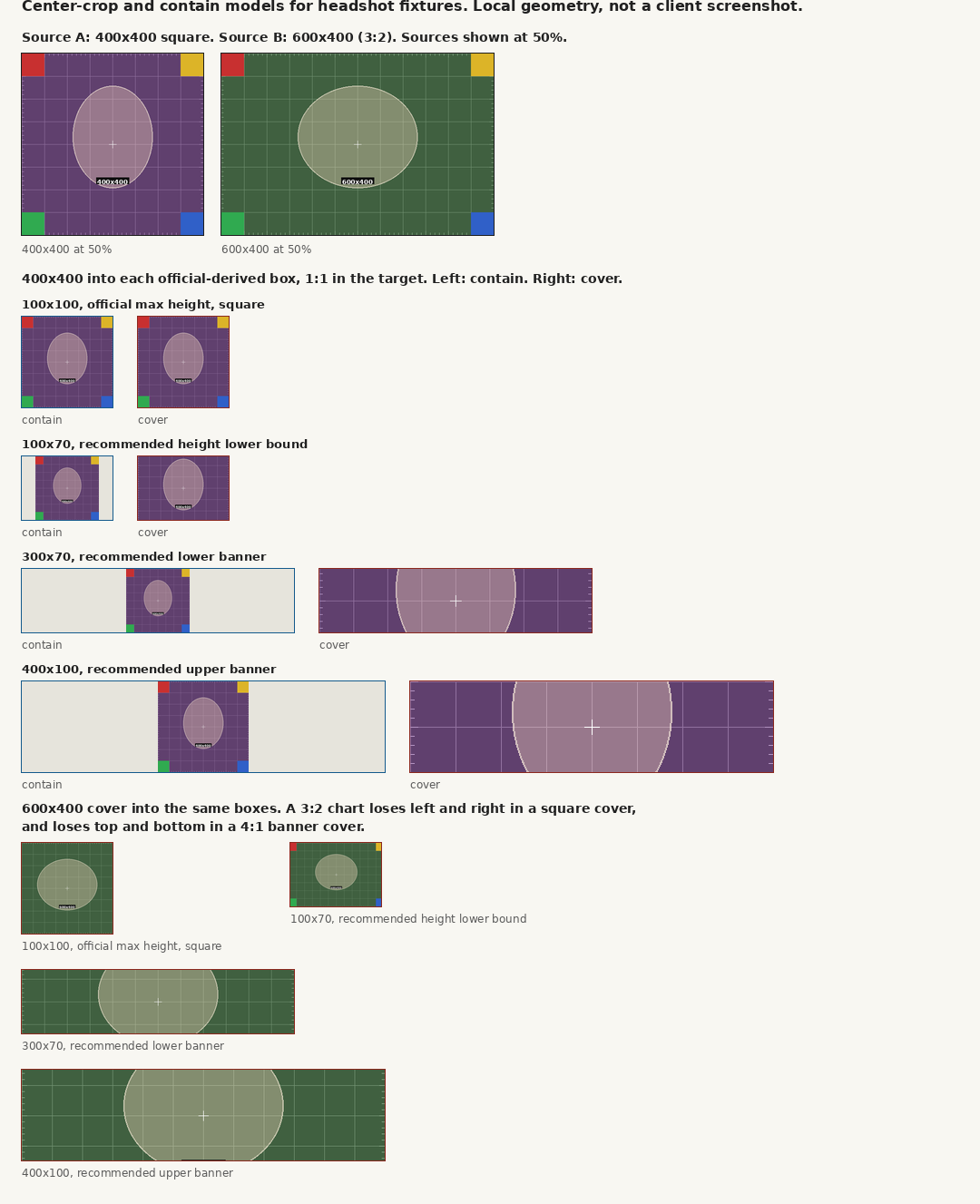
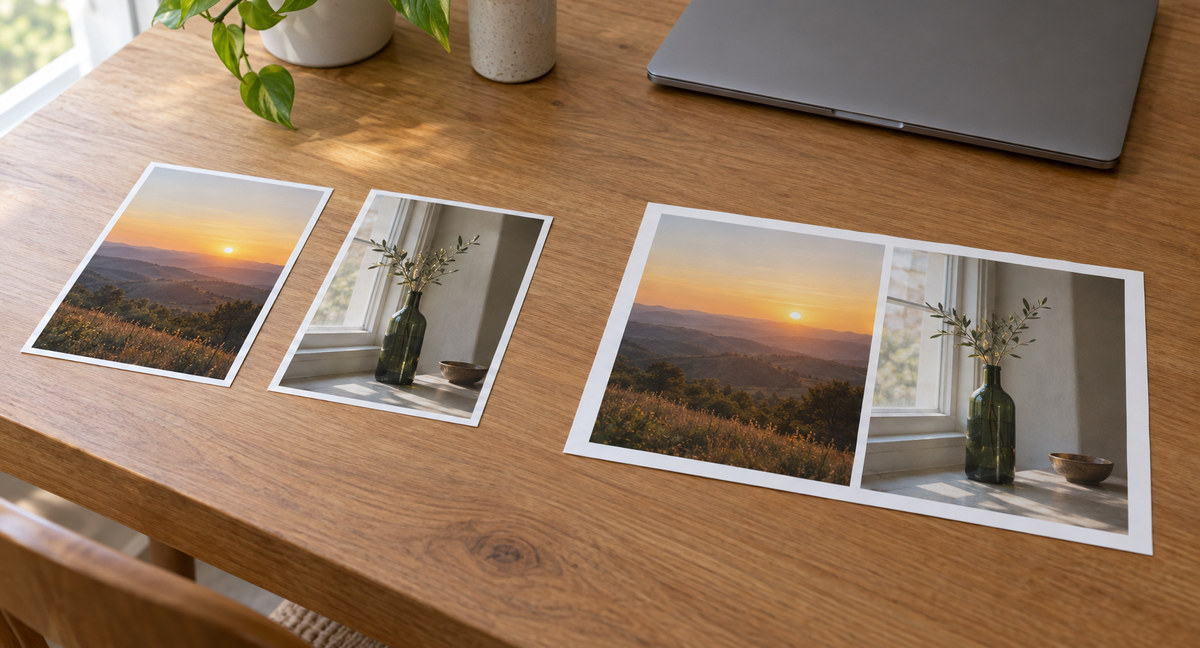
Figure 3. Headshot-style fixtures in official-derived boxes. Contain letterboxes; cover center-crops. The 400×400 into 400×100 cover keeps a horizontal band through the middle of the oval and discards the rest. Local geometry, not a client screenshot.
A compact excerpt of the model
The production script also writes fixtures, figures, and CSV. The core geometry is small:
from decimal import Decimal, ROUND_HALF_UP

def round_px(value: float) -> int:
    return int(Decimal(str(value)).quantize(Decimal("1"), rounding=ROUND_HALF_UP))

def contain(src_w, src_h, box_w, box_h):
    scale = min(box_w / src_w, box_h / src_h)
    return scale, src_w * scale, src_h * scale

def cover_center(src_w, src_h, box_w, box_h):
    scale = max(box_w / src_w, box_h / src_h)
    crop_w = src_w * scale - box_w
    crop_h = src_h * scale - box_h
    x0 = (crop_w / 2.0) / scale
    y0 = (crop_h / 2.0) / scale
    return scale, x0, y0, src_w - x0, src_h - y0
contain(800, 200, 400, 100) returns scale 0.5 and a 400×100 display. cover_center(400, 400, 400, 100) returns scale 1.0 and a source window of (0, 150)–(400, 250). Both match the unit tests.
A client check I did not run
The table below is a worksheet, not a result. Predicted values are the local model. Observed cells are blank because this environment has no browser, and no mail was sent. The companion out/results.md file has the longer matrix.
| Fixture | Local model prediction | Gmail web compose | Gmail received | Outlook classic | Outlook on the web |
|---|---|---|---|---|---|
| unofficial-800x200.png into 400×100 | Contain or cover: scale 0.5, 400×100, no crop. Upload enforcement untested. | untested | untested | untested | untested |
| gmail-official-max-1000x100.png in a 320 px pane | max-width:100% height:auto model: 320×32. | untested | untested | untested | untested |
| headshot-square-400x400.png into 400×100 | Contain: 100×100 with 300 px letterbox. Cover: scale 1.0, source window y=150–250. | untested | untested | untested | untested |
| headshot-3x2-600x400.png into 100×100 | Cover: scale 0.25, source window x=100–500. | untested | untested | untested | untested |
A later compose-only check can close the client gap: insert unofficial-800x200.png, gmail-official-max-1000x100.png, and headshot-square-400x400.png into a Gmail web signature, a classic Outlook signature, and an Outlook on the web signature, then record whether the upload was accepted, whether the client resized the file, and the displayed width and height. Do not send the messages. That check is optional and is not required for the numbers above.
Limits
No browser was used, and no test email was sent, so nothing in this post is an observation of Gmail or Outlook rendering. I did not test whether Gmail rejects, downscales, or accepts a file taller than 100 pixels. I did not map Gmail's Small, Medium, Large, or Original editor options to pixel sizes, and I did not measure how Gmail counts an image toward the 10,000-character limit. Support for object-fit, max-width, and HTML width and height attributes in any particular email client is untested here. Microsoft's Outlook signature pages, as fetched on 22 November 2026, do not publish a recommended pixel size. File-size comparisons are for these calibration charts only.
The practical step that does not require a client screenshot is still the official one. If you are building for Gmail's documented boxes, resize the file to at most 100 pixels high, and prefer the 300–400 by 70–100 recommended range, before you paste the HTML. If the image is a headshot rather than a 4:1 banner, decide in advance whether unused width (contain) or a center crop (cover) is the layout you want, because those two models are far apart in a wide, short strip. Outlook, on the official page I have, leaves the pixel size to you and documents a Size tab with Lock aspect ratio. The layout math can tell you what a chosen box will do to a file. It cannot stand in for a rendering test I did not run.
About the author
- Indie developer building AI video and growth tools. I write about generative video models, SEO automation, MCP and shipping Next.js apps.
Comments
Join the discussionNo comments yet. Be the first to comment.